Skip to content

Tell Billy once. It keeps doing it.

Say in plain words what should happen and when. Billy runs the job on schedule, keeps the lists up to date and follows up until things are closed.

Put it on a schedule.

Ask once, in a sentence. Billy runs it every day, on weekdays only, or at a time you set. Below, one reminder from our own Slack: set, changed, and what Billy then posted.
    1. A daily reminder, in one sentence

      Screenshot of one Slack message from 6 November. Abhi (Nov 6th at 11:18 AM): “@Billy pls setup a reminder for everyone to post.” Under it, Slack’s line “1 reply”.

      At 11:18 AM on 6 November Abhi asks Billy for a reminder for everyone to post. Left out: Billy’s reply in the same minute, which is the first result in the third picture.

    2. And changed in one sentence

      Screenshot of a Slack thread from 8 November. Abhi writes: “@Billy skip these reminders on weekends”. Billy replies: “Done - the daily 12:45 pm LinkedIn post reminder now runs weekdays only, no more weekend posts. Next one is tomorrow (Monday) at 12:45 pm. The Monday 9 am Sanjay reminder was already a one-off on a weekday, so it’s unaffected.”

      At 1:18 PM on 8 November Abhi asks Billy to skip the reminders on weekends. In the same minute Billy switches the job to weekdays only and says when the next one runs.

  1. What it posted, as Slack lists it

    Screenshot of search results in Slack. At the top left Slack says “Sorted by Oldest” and under it “9 results”; at the top right is a link, “Give feedback”. Then nine results, one under another, each a message from Billy in the private channel linkedin-growth-concierge with its date and time at the right. Nov 6th at 11:18 AM, in a thread: “Done - a daily reminder is set in this channel for 12:45 pm telling everyone to make their LinkedIn posts live and drop the link here. First one fires in 1h 27m (today at 12:45 pm). Want a different time or cadence, … Show more”. Nov 6th at 12:45 PM: “Reminder: time to make today’s LinkedIn posts live”, a raised-hands emoji, “Once your post is up, drop the link here so the team can like, comment and boost it.” One reaction under it. Nov 7th, Nov 8th, Nov 9th and Nov 10th, each at 12:45 PM: the same reminder. Nov 11th at 12:45 PM: “No LinkedIn posts to go live today (posting is skipped today per Abhijeet’s note) - today’s activity is commenting on and … Show more”. One reaction under it. Nov 12th and Nov 13th, each at 12:45 PM: “Reminder: time to make today’s LinkedIn posts live”, a raised-hands emoji, “Once your post is up, drop the link here so everyone can boost it.” The words LinkedIn and posts are marked in yellow in every row. Over the picture, the site draws a thin green outline around the Nov 11th row with the label “The exception: no posts that day”; the outline and the label are marked by us and are not part of the screenshot.

    Slack’s own search results for Billy’s posts in that channel that contain “LinkedIn posts”, oldest first. After the confirmation at 11:18 AM on 6 November comes one post at 12:45 PM on each day from 6 to 13 November, and none on the weekend of 14 and 15 November. On 11 November the post says there is nothing to post that day. The green outline and its label are ours, drawn over the picture. Taken at 7:21 AM on Monday 16 November, before that day’s post.

Billy in our own Slack.

Hand Billy the small stuff.

A calendar invite from a thread, a reminder on the day you promised. Billy does what you ask and follows up until it’s closed.

A meeting, booked from a thread1 of 2

Screenshot of a Slack thread from 28 October, from Abhi’s message at 11:39 PM: “Does 9 am work? @Sanjay Apologies a bit caught from 10 am to 1 pm tomorrow”. Sanjay (11:42 PM): “Yes works”. Abhi (11:44 PM): “@Billy pls send an invite”. Billy replies: “@Abhi Invite sent - Website Transition Kickoff, tomorrow (Thu, 29 Oct) 9:00-9:30 AM IST, with you, Aditya and Sanjay all invited.” A Google Meet link follows, with the end of its code blurred, then a link to open the event, and one reaction under the reply.

Billy in our own Slack.

At 11:39 PM on 28 October Abhi asks whether 9 AM works, Sanjay says yes, and at 11:44 PM Abhi asks Billy to send an invite. Billy takes the time and the guests from the thread and books the call for Abhi, Sanjay and Aditya. Left out: the earlier messages of the thread, where the call is proposed and Aditya writes. The end of the Meet code is blurred.

Show Billy what broke.

Tell Billy what broke, in a message. Billy reads your team’s bug list for the same fault first, then adds a row or updates the one already tracking it, once you approve, and says when it is in.

How we run on Billy ourselves.

This week’s sprint, kept in Slack

On 16 November Tamaghna adds a ticket to the sprint list and Vishal closes a row. Billy marks it done, then reads the page itself as the proof.

  1. Tamaghna adds a ticket

    At 9:12 AM on 16 November Tamaghna asks Billy for a new sprint ticket with an owner, a due date, a dependency and acceptance criteria. At 9:13 AM Billy adds the row and says where it put the dependency, since the list has no notes column. Asked for this page.
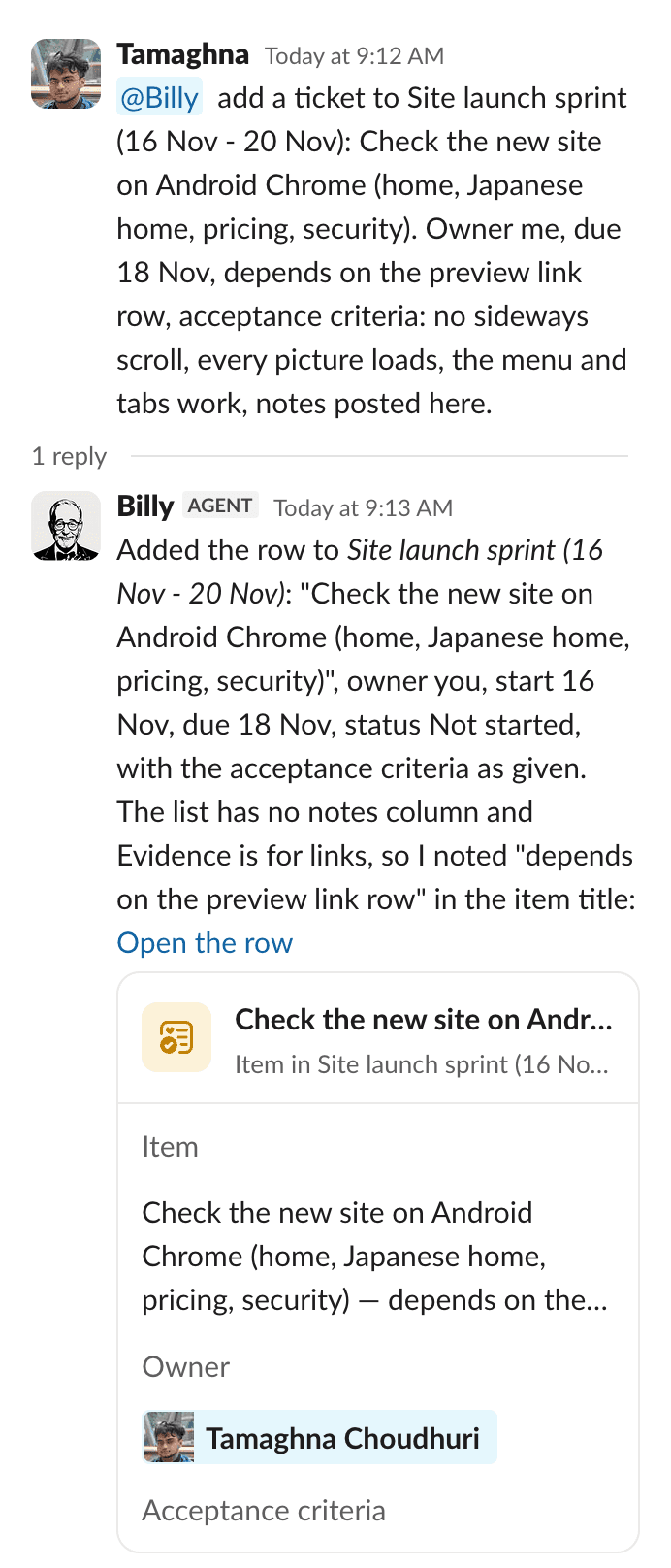
    Screenshot of a Slack thread, two messages. Tamaghna writes: “@Billy add a ticket to Site launch sprint (16 Nov - 20 Nov): Check the new site on Android Chrome (home, Japanese home, pricing, security). Owner me, due 18 Nov, depends on the preview link row, acceptance criteria: no sideways scroll, every picture loads, the menu and tabs work, notes posted here.” Under it Slack’s line “1 reply”. Billy replies: “Added the row to Site launch sprint (16 Nov - 20 Nov): ‘Check the new site on Android Chrome (home, Japanese home, pricing, security)’, owner you, start 16 Nov, due 18 Nov, status Not started, with the acceptance criteria as given. The list has no notes column and Evidence is for links, so I noted ‘depends on the preview link row’ in the item title: Open the row”. Under it the row as a card: Item, Check the new site on Android Chrome (home, Japanese home, pricing, security) - depends on the preview link row; Owner, Tamaghna Choudhuri; Acceptance criteria, No sideways scroll, every picture loads, the menu and tabs work, notes posted here; Status, Not started.
  2. Vishal reports it works

    At 9:31 AM on 16 November Vishal tells Billy the preview link opens without a login and asks Billy to mark the row done. Left out: the start of the thread at 9:13 AM, where Vishal took the row (that request was asked for this page), and Slack’s link preview under the message. Part of the address is blurred.
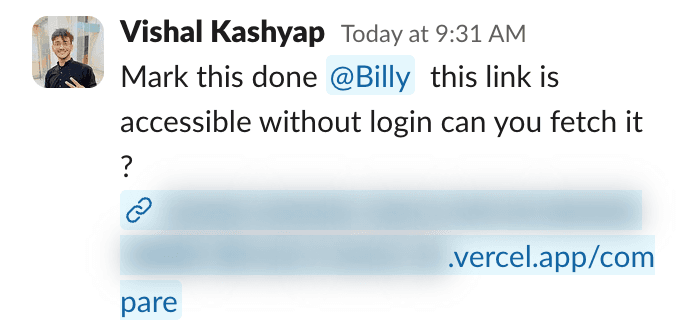
    Screenshot of one message in a Slack thread. Vishal Kashyap writes: “Mark this done @Billy this link is accessible without login can you fetch it ?” and under it the address of the preview, ending “.vercel.app/compare”, its first part blurred.
  3. Marked done

    At 9:32 AM Billy marks the row Done and says it fetched the page itself: it loads with no login. Slack shows the row under the reply. Left out before the next step: messages in the channel at 10:03 and 10:04 AM about what counts as the row’s Evidence.
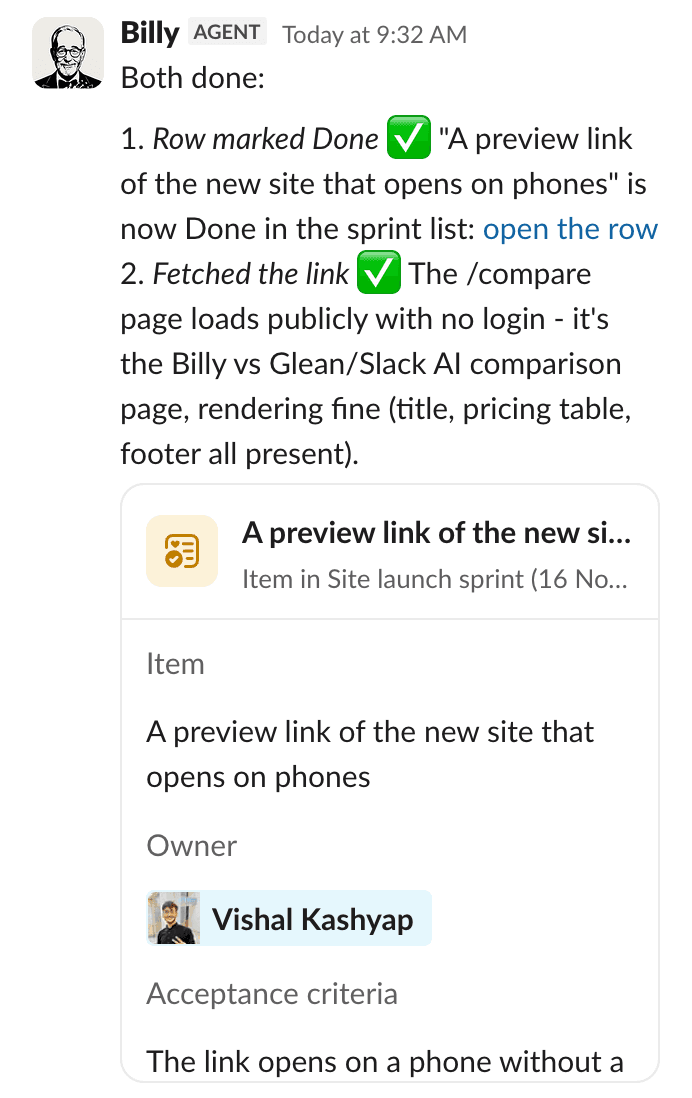
    Screenshot of one message in a Slack thread. Billy replies: “Both done: 1. Row marked Done (tick) ‘A preview link of the new site that opens on phones’ is now Done in the sprint list: open the row 2. Fetched the link (tick) The /compare page loads publicly with no login - it’s the Billy vs Glean/Slack AI comparison page, rendering fine (title, pricing table, footer all present).” Under it the row as a card: Owner, Vishal Kashyap; Acceptance criteria, The link opens on a phone without a login; Evidence, a link that Slack cuts short; Status, Done.
  4. Billy checks the pages itself

    At 10:09 AM, in the same thread, Vishal asks Billy to read the two pages itself as the row’s proof. In the same minute Billy answers that both pages load with no login, says it has put that into the row’s Evidence, and shows the row, Done. Vishal’s attached screenshot is collapsed, as Slack shows it.

    Screenshot of two messages in a Slack thread. Vishal Kashyap (Today at 10:09 AM): “@Billy evidence will be that you (billy) is able to read the webpage (without any one login blocker) - can you read the pages and confirm it ? also here is the link open in an incognito mode”, with an attachment shown collapsed as “image.png”. Billy (Today at 10:09 AM): “Yes, I can read both pages - no login blocker anywhere: 1. Home page (tick) Loads fully: ‘Billy · The AI butler in your Slack’ - hero, integrations, pricing, FAQ, footer all readable. 2. /compare page (tick) Loads fully: ‘Billy compared with Glean, Slack AI and other AI assistants for Slack’ - the full comparison table renders. I’ve also put that confirmation into the Evidence column on the sprint row: open the row. Your incognito screenshot matches what I fetched, so the acceptance criterion (opens without a login) is met.” Under it the row as a card: A preview link of the new site that opens on phones, Item in Site launch sprint (16 Nov - 20 Nov); Owner, Vishal Kashyap; Acceptance criteria, The link opens on a phone without a login; Evidence, “Billy fetched both pages on 16 Nov 2026 with no …”; Status, Done.

A clean-up, and a question before deleting

On 22 September Arjun asks Billy to tidy a channel’s canvases. Billy makes the archive, then asks before deleting nine lists, because that cannot be undone.

  1. Asked to tidy up

    At 9:16 PM on 22 September Arjun asks Billy to clean up the channel’s canvases: keep only this month’s in the tab, and put links to the older ones in a canvas called Old Months.
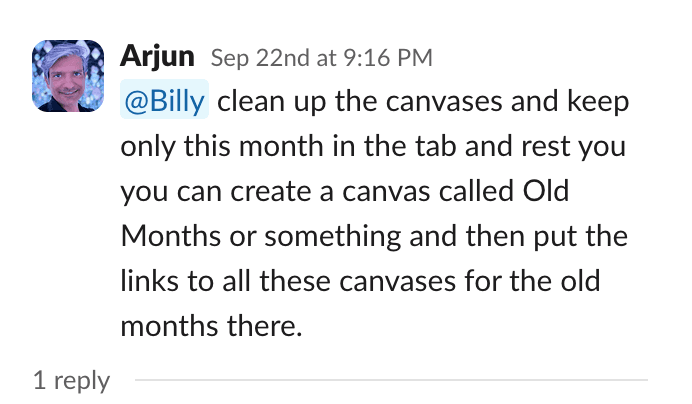
    Screenshot of a Slack message from 22 September, 9:16 PM. Arjun writes: “@Billy clean up the canvases and keep only this month in the tab and rest you you can create a canvas called Old Months or something and then put the links to all these canvases for the old months there.” Under it is Slack’s line “1 reply”.
  2. Made, then a question

    The second part of Billy’s reply at 9:17 PM: the Old Months canvas is made, with links to all nine older documents. Before removing anything Billy asks, because the nine are Slack Lists and deleting a List cannot be undone. Left out: the first part of the reply, which lists what Billy found. A freelancer’s name is blurred.

    Screenshot of the second and third parts of a Slack reply from Billy. “2. ‘Old Months’ canvas - created” with a green tick, “with links to all 9 older month-tagged docs (Oct’25 through Aug’26).” Then “3. Keep only this month’s, remove the rest - needs your confirmation first: Two things I want to flag before I touch anything:” with two points: there is no doc actually tagged “Sep’26” yet, so nothing currently matches “this month’s canvas” to keep; and the 9 older items are Slack Lists (trackers with real rows of data), not empty canvases, so removing them from the tab means deleting them outright (there is no way to just unpin a List), which is irreversible. The reply ends: “So: do you want me to go ahead and delete those 9 Lists now that they’re archived (as links) in Old Months, or would you rather I leave them in place and just start a fresh ‘Design Tasks/Goals - Sep’26’ doc for this month? And should the 4 non-dated docs”, then names them (website content, brand guidelines, a testimonial tracker and a work tracker named after a person, whose name is blurred) and ends: “stay untouched either way?”
  3. The canvas Billy made

    The Old Months canvas, opened on 15 November: one line on what it is for, then links to the nine older documents.
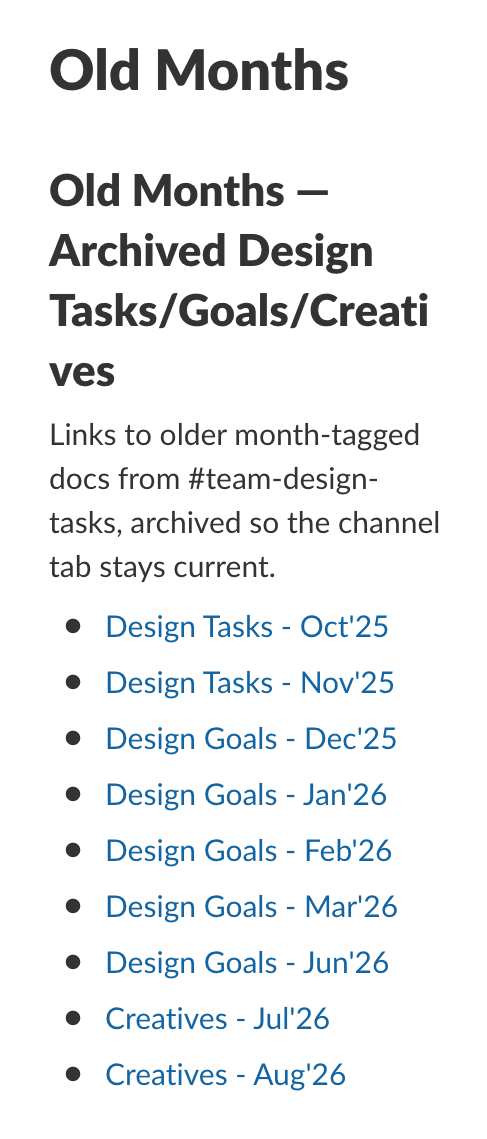
    Screenshot of a Slack canvas titled Old Months, taken on 15 November 2026. Under a heading that names Old Months and the archived Design Tasks/Goals/Creatives it says: “Links to older month-tagged docs from #team-design-tasks, archived so the channel tab stays current.” Nine links follow: Design Tasks for October and November 2025, Design Goals for December 2025 to March 2026 and for June 2026, and Creatives for July and August 2026.
Billy in our own Slack.

Questions.

All questions
Does Billy message other people on its own?

Only when someone asks it to. Ask Billy to send an invite to the people in a thread and it does. Billy can also show you a card to approve before it acts, as it did before posting for Arjun in another channel.

Up and running within a day.

Book a call with us. We’ll show you Billy live.

Billy is taking on five pilot companies while its security reviews are in progress. That is why, for now, it starts with a short call.

Book a call (opens in a new tab)

Free for one month.

We’re choosing five pilot companies; three places are open. After the free month it is $2 per seat per month, locked in for a year, and you can leave any time.

Leave any time

  1. FreeThe first month

  2. $2 per seat per monthLocked in for a year

  3. After the pilotsStandard pricing

Pricing